Acclamare provides the ability to define as many printers as you require and to direct specific documents to specific printers or other output methods such as Fax or Email.
Prior to defining a printer in Acclamare, you must first create your network printers and assign them a Share Name.
Be sure that each workstation operating system is configured to include these shared printers.
Make note of the exact share name you assign. A typical share is referenced in \\serverpath\sharename format. (Ex: \\SVR1\FrontOfficeColor). Within Acclamare, you cannot directly control printer settings such as paper size, landscape/portrait mode, or paper tray.
However, you can control these settings indirectly. For a single physical printer, define two separate printer shares on your network. For each share, you can edit the properties to specify the paper tray and other settings.
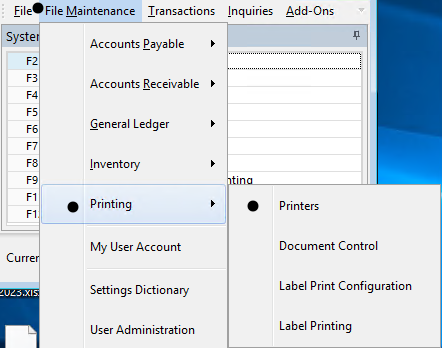
Within Acclamare, printers are defined via
File Maintenance -> Printing -> Printers.
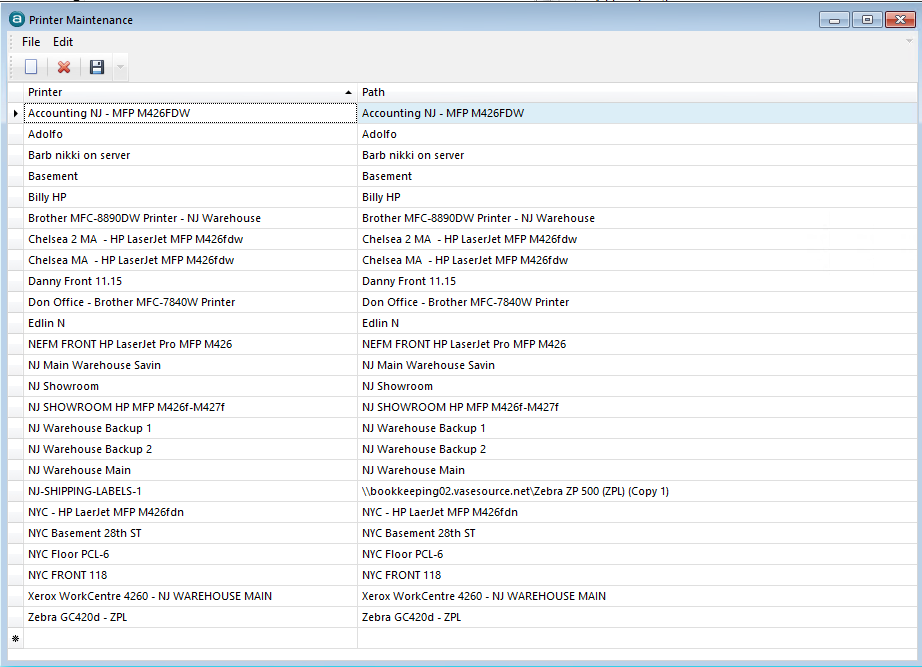
Assign a unique printer name and the path to the shared printer.
The unique printer name is what you will see as available printer choices as you begin configuring Document Settings. .