The "Merge Item" feature in Acclamare is designed to consolidate two inventory items into one. This ensures that all relevant data associated with the item to be removed (@RemoveItemId) is transferred to the item to be kept (@KeepItemId). Below is a detailed table-by-table explanation of the changes made during this process.
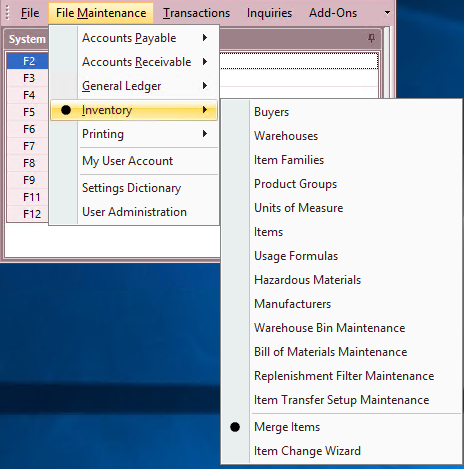
- File Maintenance - Inventory - Merge Items
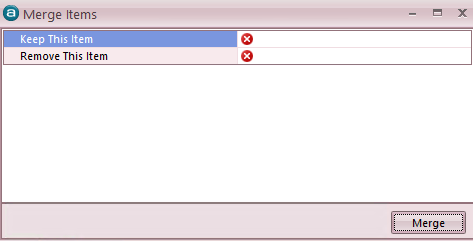
- Keep this Item - Enter the Item number for the item that you would like to keep in the system.
- Remove this Item - Enter the Item number for the item that you would like to be removed from the system.
Table-by-Table Changes
- Attached-Document-Item
- Action: Update
- Description: All references to ItemId that match @RemoveItemId are updated to @KeepItemId.
- Commission-Plan-Bracket
- Action: Update
- Description: All references to ItemId that match @RemoveItemId are updated to @KeepItemId.
- Counter-Sale-Credit-Line, Counter-Sale-Line, Counter-Sale-Order-Line
- Action: Update
- Description: All references to ItemId that match @RemoveItemId are updated to @KeepItemId.
- Customer-Credit-Line, Customer-Item, Customer-Job-Line, Customer-Quote-Line, Customer-Return-Line, Customer-Unreturn-Line
- Action: Update
- Description: All references to ItemId that match @RemoveItemId are updated to @KeepItemId.
- Item-Alternate
- Action: Update & Insert
- Description: All references to ItemId that match @RemoveItemId are updated to @KeepItemId. Additionally, a new alternate item record is created indicating the merge.
- Vendor-Quote-Line
- Action: Update
- Description: All references to ItemId that match @RemoveItemId are updated to @KeepItemId.
- Inventory-Adjustment-Detail
- Action: Update
- Description: All references to ItemId that match @RemoveItemId are updated to @KeepItemId.
- Item-Alert, Item-Bracket, Item-Compliment, Item-Rework, Item-Substitute
- Action: Delete
- Description: Records with ItemId that match @RemoveItemId are deleted. Additionally, in the case of Item-Compliment, records where ComplimentItemId matches @RemoveItemId are also deleted.
- Item-Price-Cost-Change, Item-Rework (ComponentItemId)
- Action: Update
- Description: All references to ItemId or ComponentItemId that match @RemoveItemId are updated to @KeepItemId.
- Item-Unit-Of-Measure
- Action: Update & Insert
- Description: All references to ItemId that match @RemoveItemId are updated to @KeepItemId. Additionally, new unit of measure records are created if they do not exist for @KeepItemId.
- Kit-Detail, Kit-Disassembly, Kit-Disassembly-Line, Kit-Order, Kit-Order-Line
- Action: Update
- Description: All references to ItemId that match @RemoveItemId are updated to @KeepItemId.
- Kit
- Action: Conditional Update & Delete
- Description: If a kit exists for @KeepItemId, references to KitId from @RemoveItemId are updated to @KeepKit. Then, records associated with @RemoveKit are deleted. If no kit exists, the ItemId for the kit is updated to @KeepItemId.
- PA-Line, Physical-Count-Detail, Price-Contract-Item, Promotion-Item, Purchase-Order-Line, Quantity-Adjustment, Replenishment-Detail, Rework-Order-Line-In, Rework-Order-Line-Out, Sales-Invoice-Line, Sales-Order-Line, Inventory-Count, Inventory-Transfer
- Action: Update
- Description: All references to ItemId that match @RemoveItemId are updated to @KeepItemId.