Manual AR Documents are used for assessing a customer account miscellaneous type Charges and Credits that are not directly inventory related. Charges like bad check fees, fees for late payments or any number of reasons for assessing a charge to a customer account. Credits provided for customer loyalty, rebate programs, freight refunds, etc. can also be entered in this single interface.
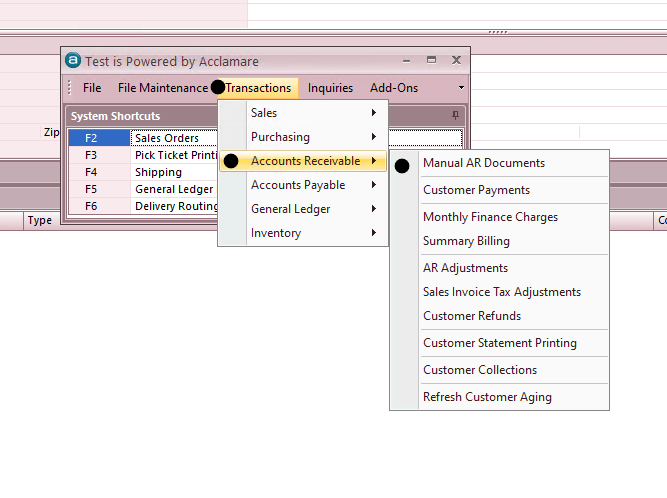
- Transactions > Accounts Receivable > Manual AR Document
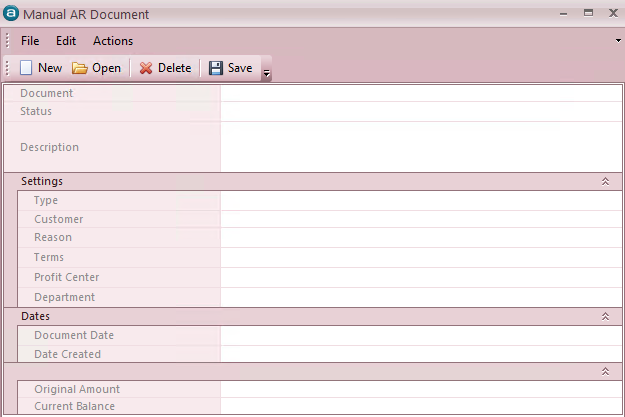
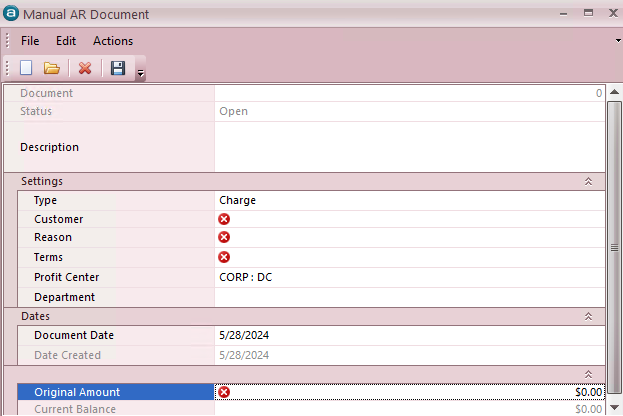
- Document – This is a system generated value and a “read-only” field. The number that appears here will be one greater than the highest record in the database, relative to other manual AR document records.Status – System generated. Status can be OPEN (new record being created), POSTED, PARTIALLY PAID or PAID.Description – This field can hold up to 8000 characters. Within this field the user will type as detailed a description as wanted as to why the charge, or credit, is being created.Type – This is a drop down field. The user can select Charge (default) or Credit.Customer – This is the customer for whom you are entering the document. You can simply type is your search variables in this field to search for your customer. (Searches can be based on Account Number, Customer Name, or any one of a number of other customizable criteria).Reason – This field is a drop down field that contains a listing of reason codes created by the user. Reason codes can be created for various charges and/or credits. Reason codes may exist for customer rebates, bad check fees, freight charges, miscellaneous credits, etc. (These reason codes are defined in the area called General Ledger Adjustment Reasons (File Maintenance > General Ledger > General Ledger Adjustment Reasons, more info on General Ledger Adjustments reason is in the following link in the 3rd section : ).Terms – Payment terms offered to the Customer. This is defaulted from the customer account, but the user can change the value and select from the drop down menu.Profit Center – This value represents the general ledger profit center that will be associated to the profit & loss account that is tied to the reason code associated to this manual AR document.Document Date – Date is defaulted to today’s date, but can be modified by the user.Date Created – System generated date that cannot be edited by the user. This date represents the date the document/record was actually created.Original Amount – This field is editable by the user when creating the document, but is set to “read only” once the document/record is posted to the general ledger. This value should be entered as a positive number when the document is a Charge, but it should be entered as a negative when the document is a Credit.Current Balance – This field is always set to read only and represents the current balance outstanding for this document.
- Completing the processSAVE – once the fields are populated as desired by the user, the user can optionally click on the SAVE icon and then choose to Print or Email the document.
- This is completely optional.
- Actions > Post this document – After all the fields are completed and the user is finished with all required entry, the user can then go to the Actions menu at the top of the screen and select “Post this document” in order to complete the process.
- Posting the document will establish the Credit, or Charge, on the customer account. The document will show up in all AR areas associated to the customer. All entries will also be completed in the general ledger.

